Payroll delivery, simplified

Automated HR Payroll Software: Convert Excel sheets into secure, bulk email pay stubs.

HR uploads a pre-prepared Excel payroll spreadsheet to the software, which intelligently understands and parses the corresponding data fields. It then securely sends individual pay stub emails to each employee. Employees can then click a button or digitally sign to acknowledge receipt.

Start from your approved payroll fileIndividual employee delivery
SugarHR payroll product interface
Excel → InboxOne clear delivery workflow
For HR teams who want to make the last step of payroll calmer, clearer, and easier to track.
Product features

PRODUCT FEATURES

From the payroll spreadsheet you already trust to a delivery record your team can follow. Explore the eight steps of the SugarHR workflow.

Excel payroll upload product screen
01 / FEATURE

Excel payroll upload

Upload your current Excel payroll file and convert it into employee-ready payslips in seconds—without changing your spreadsheet or replacing your template.

  • Import Excel payroll sheets in a variety of formats, with no template changes required.
  • Automatically recognize employee names, phone numbers, email addresses, and other fields.
  • Match payroll fields with up to 99.9% accuracy.
  • Create payslips with customizable templates.
Explore this workflow →
One-click bulk send product screen
02 / FEATURE

One-click bulk send

Send payslips to employees in bulk with one click and track each delivery in real time. Ask us about popular local delivery channels available in your country.

  • Send payslips to employees in bulk by email with one click.
  • Track each delivery status in real time.
Explore this workflow →
Recall, correct & resend product screen
03 / FEATURE

Recall, correct & resend

Recall a sent payslip whenever a change is needed, edit it, and send it again. This flexible, HR-friendly workflow helps prevent mistakes from becoming difficult to reverse.

Explore this workflow →
Handwritten signatures product screen
04 / FEATURE

Handwritten signatures

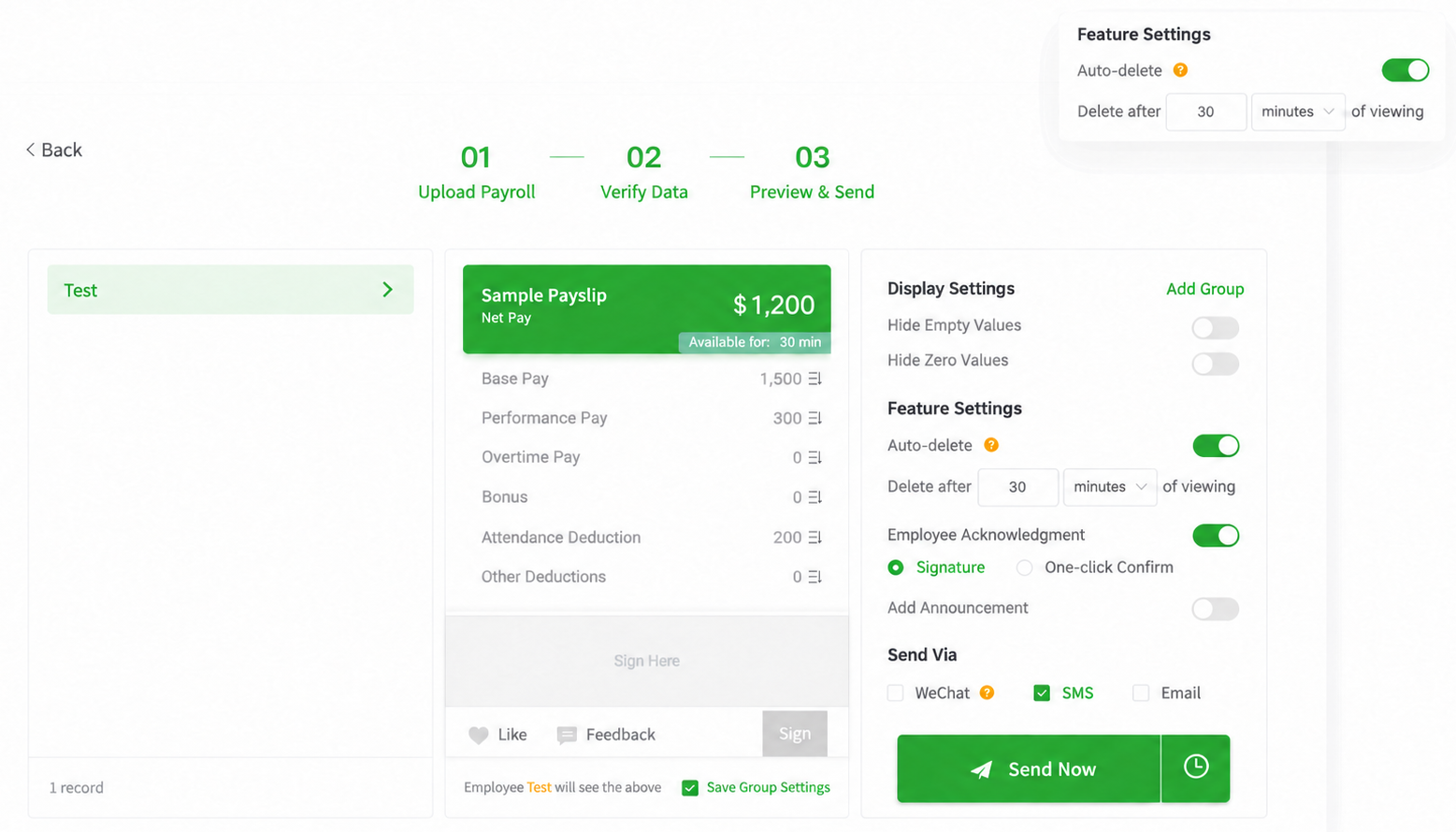
Let employees review their pay details and sign directly on the payslip. HR can collect a clear digital acknowledgment alongside each record.

Explore this workflow →
One-click acknowledgment product screen
05 / FEATURE

One-click acknowledgment

Use a lightweight confirmation option when a signature is unnecessary. Configure an automatic confirmation window to match your process.

Explore this workflow →
Time-limited payslip access product screen
06 / FEATURE

Time-limited payslip access

Set a defined access period for viewed payslips and align access settings with your organization’s document-retention policy.

Explore this workflow →
Payslip announcements product screen
07 / FEATURE

Payslip announcements

Add a clear announcement to every employee payslip in the batch. Reuse previous text to keep recurring payroll messages consistent.

Explore this workflow →
Data protection product screen
08 / FEATURE

Data protection

Manage access to sensitive employee information with controlled delivery and privacy settings designed for payroll documents.

Explore this workflow →
Solutions

Payslip workflows for six industry realities

Explore real customer stories and practical payslip workflows for teams across industries.

WHY CHOOSE SUGARHR

A proven track record behind SugarHR.

201,894enterprise customers
using our parent company’s platform
98.6%customer satisfaction
across the parent company’s platform
80%average work time saved
reported across platform workflows
100M+payslips sent cumulatively
through the parent company’s platform
FAQ

Payslip Software & Payroll Delivery FAQs

Answers about Excel payslip creation, bulk email delivery, employee access, security, and the SugarHR free trial.

Upload & Parsing

Can I use my existing Excel spreadsheet?

Yes. Upload your payroll sheet in any format — we detect the fields automatically, and you can preview everything before you send it. No need to reformat or switch to our template.

Do you calculate pay and tax for me?

No. You provide the final pay figures in your sheet; we make sure each payslip reaches the right employee securely and on time. This keeps the product simple and keeps you in full control of the numbers.

What happens to extra columns or zero-value items?

Irrelevant columns are detected and ignored automatically, and zero-value items are hidden by default, so employees aren't left wondering about them.

Delivery & Employee View

How do employees receive their payslips?

Each employee receives an email with a secure, one-time link to view or download their payslip as a PDF. No app to install, no account to create.

Can employees look back at past payslips?

Yes. Employees can view their own payslip history at any time, and you can export distribution records whenever you need them.

Can employees look back at past payslips?

Yes. Employees can view their own payslip history at any time, and you can export distribution records whenever you need them.

What if an employee doesn’t receive the email?

You can resend with one click and check the delivery status (delivered / opened). In most cases, the email simply landed in their spam folder.

What if an employee doesn’t receive the email?

You can resend with one click and check the delivery status (delivered / opened). In most cases, the email simply landed in their spam folder.

Can I schedule sends in advance?

Yes. Upload early, set a send time, and payslips arrive on payday in each employee's local time zone.

Can I schedule sends in advance?

Yes. Upload early, set a send time, and payslips arrive on payday in each employee's local time zone.

What if my employees speak different languages?

Payslips can be generated from one spreadsheet and matched to each employee’s data. Ask the SugarHR team which languages are currently available.

What if my employees speak different languages?

Payslips can be generated from one spreadsheet and matched to each employee’s data. Ask the SugarHR team which languages are currently available.

Security & Trial

What if I spot a mistake after sending?

You can void the incorrect payslip and reissue a corrected version immediately, and every step is logged. Issued records are never deleted — that's both a compliance requirement and your protection if a dispute ever arises.

What if I spot a mistake after sending?

You can void the incorrect payslip and reissue a corrected version immediately, and every step is logged. Issued records are never deleted — that's both a compliance requirement and your protection if a dispute ever arises.

Is there a free trial?

Yes. Every account starts with a 1-month free trial — upload a real sheet, send to a few employees, and decide once you've seen it work.

Is there a free trial?

Yes. Every account starts with a 1-month free trial — upload a real sheet, send to a few employees, and decide once you've seen it work.

Start a conversation

Make your next pay stub run easier.

Tell us a little about your team. We’ll help you explore how SugarHR could fit your existing workflow.

✓
Try SugarHR for FreeShare your work email and team size to get started.
✓
Prefer a walkthrough?Request a product demo using sample payroll data.

Talk with the SugarHR team

Tell us a little about your organization. We’ll follow up about your inquiry.